About
What is creVass?
creVass is an AI-driven plumbing micro-aggression framework.
Sniff the creVass with your coffee with for your curated dose of annoying and obvious intelligence which nobody wants dig out of the creVass.
TL;DR
It’s just like those engr handbook instructions used by HVAC installers as kneepads when they’re installing a furnace exhaust wrong so that the service calls keep coming.
Philosophy
If not for plumbers and HVAC technicians, who else would install the shit that you depend on WRONG? You can’t fuck this stuff up that badly on your own so do not try.
A set of conventions
creVass was originally forked from Surround … and we have not gotten around to understanding what Surround does or tries to do yet … but the following might be useful stuff to screw up.
Apparently, Surround attempts to enforce a set of conventions to help researchers keep their solutions structured for software developers and implements solutions for common ML project concepts such as managing configuration so that they don’t have to.
These conventions are adhered to through the use of a project generator and project linter that will check for the core conventions. For example during project generation, the following structure is used:
package name
├── Dockerfile
├── README.md
├── data
├── package name
│   ├── stages
│   │   ├── __init__.py
│   │   ├── input_validator.py
│   │   ├── baseline.py
│   │   └── assembler_state.py
│   ├── __init__.py
│   ├── __main__.py
│   ├── web_runner.py
│   ├── file_system_runner.py
│   └── config.py
├── docs
├── dodo.py
├── models
├── notebooks
├── output
├── requirements.txt
├── scripts
├── spikes
└── tests
Every Surround project has the following characteristics:
Dockerfilefor bundling up the project as a Docker container.dodo.pyfile containing useful tasks such as train, batch predict and test for a project.Tests for catching training serving skew.
A single entry point for running the application,
__main__.py.A place for data exploration with Jupyter notebooks and miscellaneous scripts.
A single place, for output files, data, and model storage.
A command line tool
Surround also comes with a command line tool (CLI) which can perform a variety of tasks such as project generation and running the project in Docker. The tools included are shown below:
init- Used to generate a new Surround project.lint- Used to run the Surround Linter which checks if Surround conventions are being used correctly.run- Used to run a task defined indodo.py.
Where the run command is essentially a wrapper around the doit library and the Surround Linter will perform multiple checks
on the current project to see if it is following standard conventions. The intention of the Surround Linter will to become more
of an assistant when building ML projects. These tools are automatically added to your environment path so they can be used anywhere
in your preferred terminal application.
A Python library
The last component of Surround is the Python library. We developed the Python library to provide a flexible way of running a ML pipeline in a variety of situations whether that be from a queue, a http endpoint or from a file system. We found that during development the research engineer often needed to run results from a file, something that is not always needed in a production environment. Surround’s Python library was designed to leverage the conventions outlined above to provide maximum productivity boost to research engineers provided the conventions are followed. Surround also provides wrappers around libraries such as the Tornado web server to provide advanced functionality. These 3rd party dependencies are not installed by default and need to be added to the project before Surround will make the wrappers available.
How does Surround work at its core?
At its core, there are four main concepts that you need to understand while using Surround, these are:
The most important being the first two since they make up the actual pipeline that is responsible for taking in data and spitting out a prediction based on that input.
Assembler
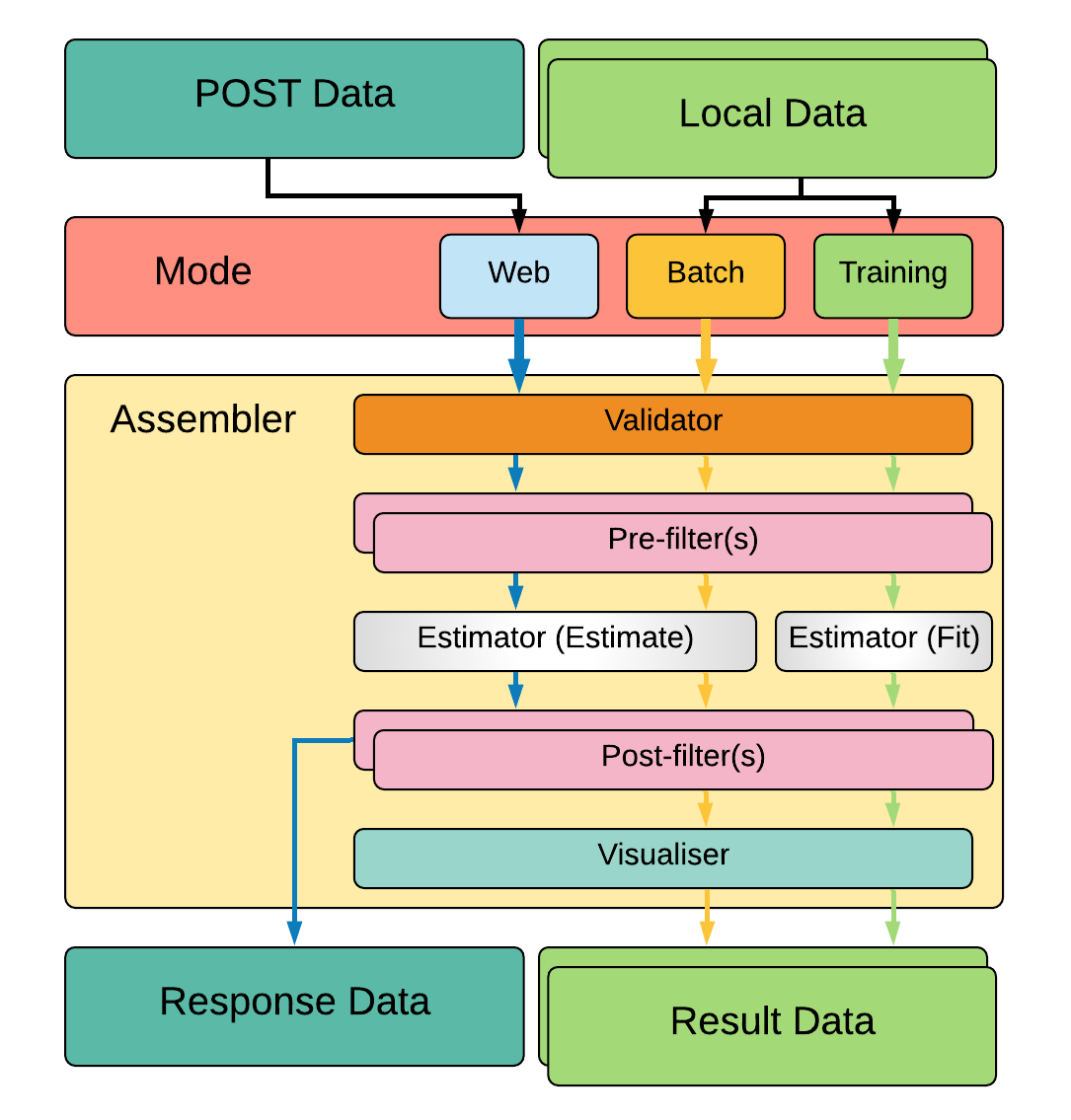
The Assembler is responsible for constructing and executing a pipeline on data. How the pipeline is constructed (and where/how data is loaded) depends on which execution mode is being used. The above diagram describes a simple Surround pipeline showing three different modes of execution. These modes are described below.
Training

Primarily built for training, training data is loaded from disk (usually in bulk) then fed through the pipeline
with the estimator set to fit mode. Once training the pipeline is complete the data is then fed to a visualiser which
will help display useful information about the training operation.
Batch-predict

Primarily built for evaluation, data is loaded from disk (also usually in bulk) then fed through the pipeline with
the estimator set to estimate mode. Once processing is complete the data is then fed to a visualiser which
will help summarise and visualise the overall results / performance.
Web / Predict

This mode is built for production. When your pipeline is setup, training has been completed, evaluation of the model shows good performance and is ready for use, this mode is to be used to serve your pipeline. Depending on the type of project you generated initially, the input data may come from your local disk or from the body of a POST HTTP request and the result may be saved locally or returned to the client who sent the request.
Stages
A stage, at its base, can do three things:
Initialize anything needed to complete its function. This may include a loading a Tensorflow graph or loading configuration data.
Perform its intended operation. Whether that be feeding data through a model or checking if the data is correct.
Dump output from the operation to the console (if requested, used for debugging).
Between each stage, during processing, there are two objects passed between them:
State object which contains the input data, has a field for errors (which stops the execution when added to) and holds the output of each stage (if any).
Configuration object which contains all the settings loaded in from YAML files plus paths to folders in the project such as
input/andoutput/.
Validators
Validators are stages that are responsible for checking if the input data that is about to be fed through the pipeline is valid. Meaning is the data the correct format, checking whether there is any detectable reason why the data would cause issues while being processed. This stage is positioned first in the execution of the pipeline, they are not intended to create any output, only errors or warnings.
Filters
Filters are stages that are responsible for getting data ready for the next stage of execution. These are typically placed before or after Estimators. There are generally two types of filters: Wranglers (Pre-filters) and Deciders (Post-filters).
Wranglers (Pre-filters)
Wranglers perform data wrangling operations on the data. Meaning getting the data from one format into another that is useful
for the next stage (typically an Estimator). For example the input data might be a str formatted in JSON but the estimator
next in the pipeline might only accept a Python dict so a Wrangler would be used to parse the str into a dict.
Deciders (Post-filters)
Deciders, placed after Estimators, are stages which make descisions based on the output of them. For example in a Voice Activity Detection pipeline, we may have an estimator that outputs confidence values on whether the input audio data was speech or not, you would then place a Decider after which may perform thresholding on the confidence values.
Estimators
Estimators are stages where the actual prediction or training of an ML model takes place. Depending on the pipeline configuration the estimator will either use the input data to make a prediction or use the input data as training data. This stage should have some form of output. Typically placed between two Filters during execution. For example you may be using Tensorflow to run your model, so an estimator would be created, which would load the model and create a Tensorflow session during initialization and the session would be ran with the input data during execution of the stage.
In more complex pipelines, these stages may be composed of an entirely separate Surround pipeline (another Assembler instance). Surround is designed this way to allow pipelines as complex as required.
Visualisers
Visualisers are stages where they do what their name entails, visualize the data. Typically used during training and evaluation of the model, these stages are used to generate reports on how the model is performing. For example in a Facial Detection pipeline during evaluation of the model, the visualiser may display an example image it processed and render boxes around the faces it detected.
Configuration
Every instance of Assembler has a configuration object constructed from the project’s configuration file. This configuration object is passed between each stage of the pipeline during initialization and execution. The configuration file uses the YAML data-serialization language.
Example configuration file:
pathToModels: ../models
model: hog                                                       # 'hog' or 'cnn'
minFaceWidth: 100                                                # Threshold for the width of a face bounding box in pixels
minFaceHeight: 125                                               # Threshold for the height of a face bounding box in pixels
useAllFaces: true                                                # If false, only extract encodings for the largest face
imageTooDark: 23                                                 # Threshold for determining if an image is too dark, lower values = darker image
blurryThreshold: 4                                               # Smaller values indicate a "more" blurry image
gpuDynamicMemoryAllocation: true                                 # If true, Tensorflow will allocate GPU memory on an as-needs basis. perProcessGpuMemoryFraction will have no effect.
perProcessGpuMemoryFraction: 0.5                                 # Fraction of GPU memory Tensorflow should acquire. Has no effect if gpuDynamicMemoryAllocation is true.
rotateImageModelFile: image-rotator/image-rotator-2018-04-05.pb  # Model used to detect the orientation of the image
rotateImageModelLabels: image-rotator/labels.txt                 # Model used to detect the orientation of the image
rotateImageInputLayer: conv2d_1_input                            # Tensorflow input layer
rotateImageOutputLayer: activation_5/Softmax                     # Tensorflow output layer
rotateImageInputHeight: 100                                      # Input image height to the image stage neural network
rotateImageInputWidth: 100                                       # Input image width to the image stage neural network
rotateImageThreshold: 0.5                                        # Rotate image if the orientation is above this threshold
rotateImageSkip: false                                           # Option to skip image rotation step
imageSizeMax: 700                                                # Maximum allowable image size (width or height). Images larger than this will be downsized.
postgres:                                                        # Postgres database options
    user: postgres                                               #   Postgres username
    password: postgres                                           #   Postgres password
    host: localhost                                              #   Postgres server host
    port: 5432                                                   #   Postgres server port
    db: face_recognition                                         #   Which database to connect to
webcamStream:                                                    # Webcam stream options
    drawBox: true                                                #   Whether to draw a box around detected faces
    minConfidence: 0.5                                           #   Discard detections below this confidence level
    highConfidence: 0.9                                          #   Confidence values at or above this level are deemed to be 'highly confident'
celery:
    broker: pyamqp://guest@localhost
    backend: redis://localhost
Recently we integrated Facebook’s Hydra framework to manage loading of configuration.
State
Every time an Assembler is ran, it requires an object that will be used to store the input data and eventually store the output. Passed between stages during execution, it can also be used to store any intermediate data between stages.